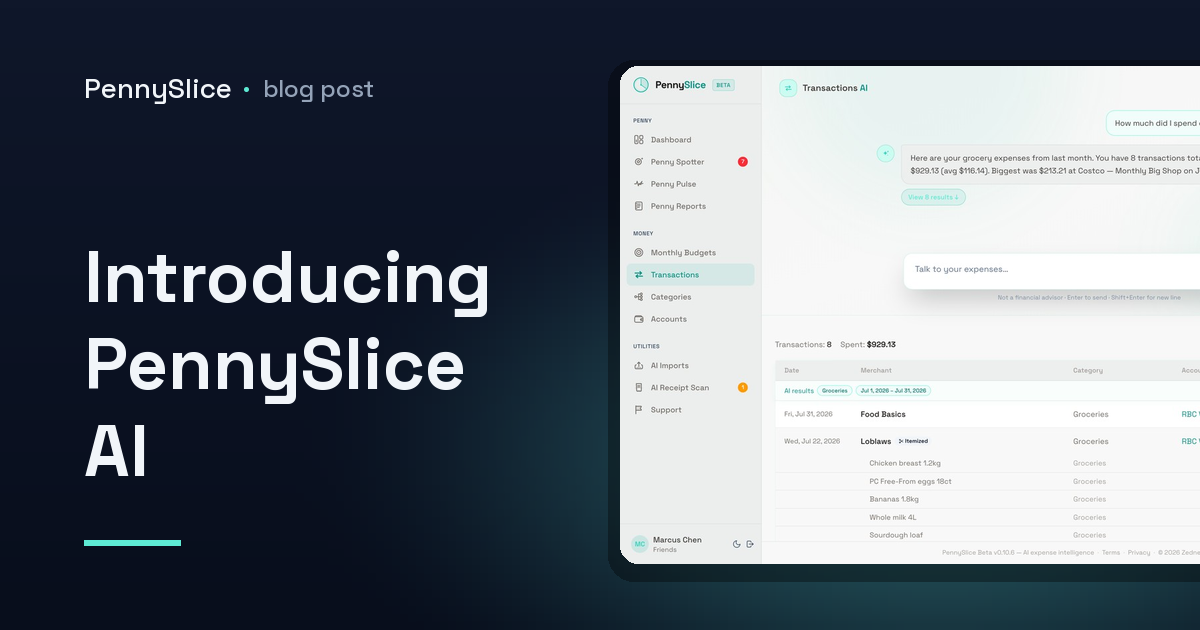
You know the feeling. You open your banking app, see a number that doesn’t look right, and start scrolling. Two hundred transactions later you have a vague sense that it was probably the restaurants, and no real answer.
PennySlice started with a simple question: why can’t you just ask?
Just ask
The main way you use PennySlice is by typing a question in plain English and getting an answer grounded in your own numbers.
- “How much did I spend on dining last month?”
- “What’s gone up compared to spring?”
- “Split that Costco trip — half groceries, half household.”
- “Can I afford a new laptop next month?”
This isn’t a chatbot bolted onto a dashboard. Conversation is how you do the work: transactions, accounts, categories, budgets, imports, receipts and forecasts each have their own engine behind them, so asking to change something changes it.
The tone we aimed for is a sharp accountant who respects your time. Real numbers, no padding, and a straight “there isn’t enough data to answer that” when that’s the truth — which we’d rather it said than guess.
Penny watches, so you don’t have to
Asking questions only helps if you think to ask. Most overspending isn’t dramatic — it’s a subscription that crept up, a category quietly running 40% hot three weeks into the month, a bill that’s about to land bigger than last time.
Penny Spotter runs in the background across seven checks: budget pace, unusual transactions, cost creep, predicted expenses, saving opportunities, income changes and spending concentration. When something’s worth your attention, it says so.
Pulse Check answers the other half — the what-ifs. “What happens to my month if I take this trip?” It works from your actual history rather than a blank calculator.
Your data, your choice
Most expense apps make you pick between convenience and control. We didn’t want to force that.
Link your bank and transactions arrive on their own. Linking uses OAuth through Plaid, so you enter your login at your bank, not with us. We never store your bank password, and you can revoke access at any time — from us or from your bank.
Or import your own exports and keep no standing connection at all. CSV, Excel, OFX, PDF statements, forwarded email receipts, or a photo of a paper one. The AI reads the file, categorises the transactions, and splits purchases that belong in more than one category.
You can mix the two, and change your mind later.
Either way: we never sell your data, we don’t show ads, and we have no advertisers to answer to. Your personal information — your name, your email, your account numbers — is never sent to the AI. It works on merchants, amounts and dates.
What PennySlice isn’t
It isn’t a financial advisor, and it won’t tell you what to do with your money. It surfaces what’s happening in your spending, answers what you ask, and flags what looks worth a second look. The decisions stay yours.
It also won’t pretend to certainty it doesn’t have. If a month’s data is thin, it will say so rather than produce a confident-looking number built on very little.
Where we are
PennySlice is in early access. The core is in daily use — importing, categorising, conversation, budgets, Penny Spotter — and we’re adding to it steadily. Early users shape what comes next more than any roadmap does, so if something is wrong or missing, we want to hear it.
Every correction you make teaches the categoriser — not only for you. The more people use it, the better it gets at reading the merchant names banks give us.
You can see the plans on the pricing page, or read how the import and linking options compare on how it works.
Talk to your expenses. It turns out to be a much better way of finding out where the money went.